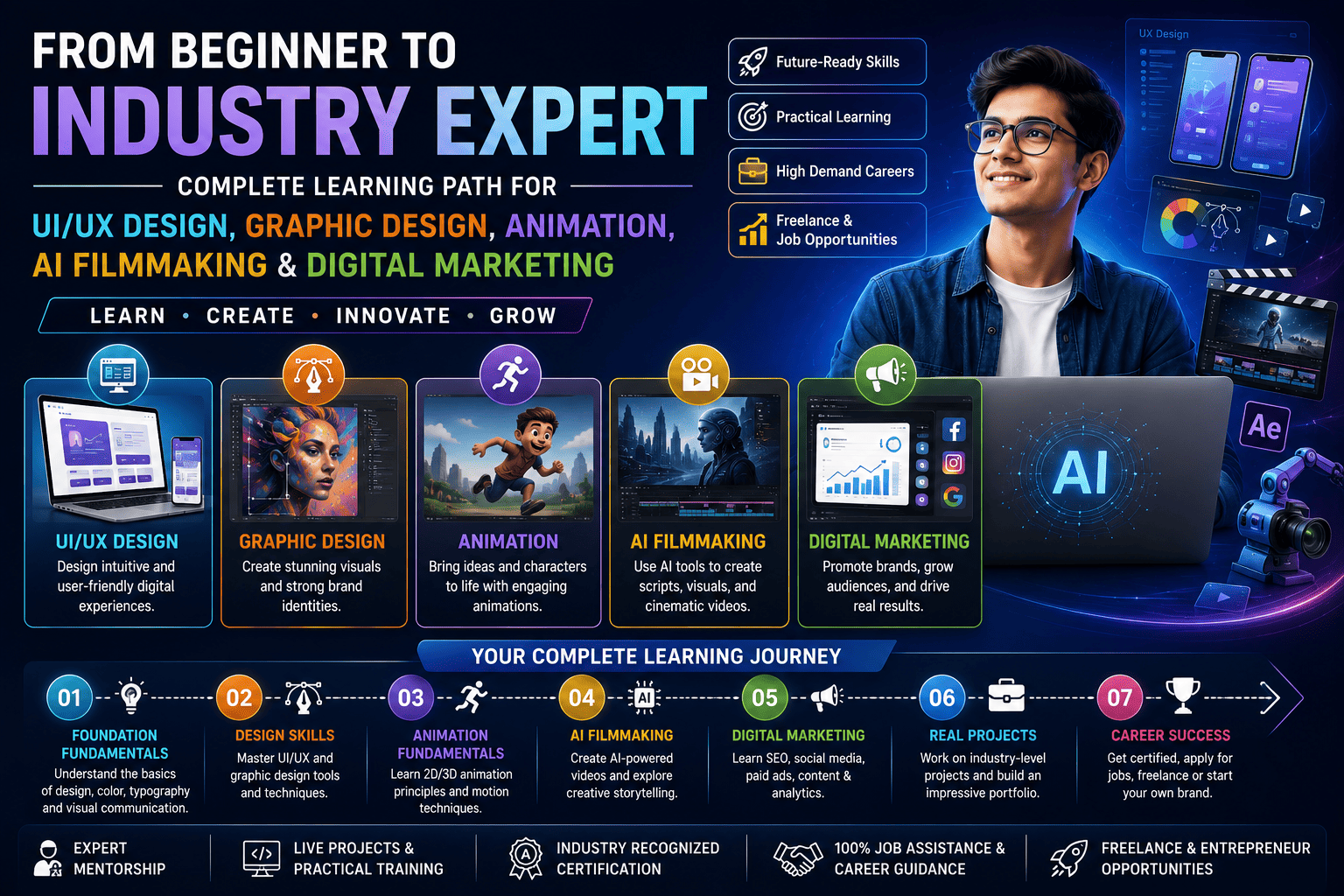
The creative and digital industries are evolving faster than ever, creating exciting opportunities for professionals who combine design, storytelling, technology, artificial intelligence, and marketing expertise. Whether your goal is to become a UI/UX Designer, Graphic Designer, Animator, AI Filmmaker, or Digital Marketing Specialist, following a structured learning path can accelerate your career growth.
This comprehensive roadmap explains how beginners can gradually develop industry-relevant skills, build an impressive portfolio, gain practical experience, and become highly employable in today’s AI-powered digital economy.
Why a Structured Learning Path Matters
Many beginners struggle because they try to learn everything at once. A well-planned roadmap helps you master one skill at a time while understanding how each discipline supports the next.
Benefits of a structured learning path include:
- Faster skill development
- Better concept retention
- Stronger portfolio projects
- Improved confidence
- Easier transition into professional roles
- Higher employability
- Readiness for freelancing and entrepreneurship
Stage 1: Build Creative Foundations
Every successful digital professional begins by understanding the principles of visual communication.
Learn the Fundamentals
- Design Principles
- Typography
- Color Theory
- Layout & Composition
- Branding Basics
- Visual Storytelling
- Creative Thinking
Recommended Tools
- Adobe Photoshop
- Adobe Illustrator
- Canva
- Figma (Basics)
A strong creative foundation improves your ability to solve design problems across multiple disciplines.
Stage 2: Master UI/UX Design
UI/UX Design focuses on creating intuitive, engaging, and user-friendly digital experiences.
Core Topics
- User Research
- User Personas
- Information Architecture
- Wireframing
- Interactive Prototyping
- Design Systems
- Accessibility
- Responsive Design
Popular Software
- Figma
- Adobe XD
- Miro
- Maze
Career Opportunities
- UI Designer
- UX Designer
- Product Designer
- Interaction Designer
Stage 3: Learn Graphic Design
Graphic Design enables you to create compelling visuals that communicate ideas effectively.
Skills You’ll Develop
- Logo Design
- Brand Identity
- Social Media Creatives
- Print Design
- Packaging Design
- Advertising Design
- Image Editing
Industry Tools
- Photoshop
- Illustrator
- InDesign
Career Roles
- Graphic Designer
- Brand Designer
- Marketing Designer
- Visual Designer
Stage 4: Explore Animation
Animation transforms static visuals into engaging experiences for entertainment, education, advertising, and digital media.
Topics Covered
- 2D Animation
- 3D Animation Basics
- Character Animation
- Storyboarding
- Motion Principles
- Visual Storytelling
- Audio Synchronization
Software
- Adobe Animate
- Blender
- Toon Boom Harmony
- Autodesk Maya (Introduction)
Career Options
- Animator
- Multimedia Artist
- Character Animator
- Animation Designer
Stage 5: Learn AI Filmmaking
Artificial Intelligence is reshaping video production by accelerating scripting, editing, visual generation, and post-production.
Skills Covered
- AI Script Writing
- AI Storyboarding
- AI Video Generation
- AI Voiceovers
- AI Image Creation
- AI Video Editing
- Prompt Engineering
Popular AI Tools
- ChatGPT
- Runway
- Kling AI
- Pika
- Adobe Firefly
- Midjourney
- ElevenLabs
Career Opportunities
- AI Filmmaker
- AI Video Creator
- Creative Producer
- Digital Content Creator
Stage 6: Master Digital Marketing
Even the best creative work needs the right audience. Digital marketing helps transform creativity into measurable business growth.
Learning Modules
- Search Engine Optimization (SEO)
- Search Engine Marketing (SEM)
- Social Media Marketing
- Email Marketing
- Content Marketing
- Google Analytics
- Marketing Automation
- Performance Marketing
Career Roles
- Digital Marketing Executive
- SEO Specialist
- Performance Marketer
- Social Media Manager
- Content Strategist
Stage 7: Learn Generative AI Across Every Skill
Generative AI is now an essential productivity partner for creative professionals.
AI Applications
- Design Assistance
- Content Generation
- Animation Support
- Video Editing
- Marketing Content
- Website Copy
- Idea Generation
- Workflow Automation
Why AI Matters
Professionals who combine creative expertise with AI literacy can work more efficiently, iterate faster, and focus on strategic problem-solving.
Stage 8: Build Real-World Projects
Knowledge becomes valuable when applied.
Create projects such as:
- Mobile App UI
- Website Design
- Brand Identity Package
- Animated Explainer Video
- AI-Generated Short Film
- Social Media Campaign
- Digital Marketing Strategy
- Portfolio Website
Practical work demonstrates your abilities more effectively than certifications alone.
Stage 9: Build a Professional Portfolio
Your portfolio should showcase:
- UI/UX Case Studies
- Branding Projects
- Graphic Design Work
- Animation Samples
- AI Video Projects
- Marketing Campaigns
- Process Documentation
- Client Testimonials (when available)
A strong portfolio is one of the most important tools for securing interviews, freelance clients, and business opportunities.
Stage 10: Prepare for Industry Success
Develop professional skills such as:
- Communication
- Presentation
- Client Management
- Team Collaboration
- Time Management
- Problem Solving
- Critical Thinking
- Continuous Learning
Employers value professionals who combine technical expertise with strong interpersonal skills.
Who Should Follow This Learning Path?
This roadmap is suitable for:
- Students after 10th or 12th
- College students
- Fresh graduates
- Working professionals
- Career changers
- Freelancers
- Entrepreneurs
- Content creators
- Startup founders
- Creative professionals
Career Opportunities After Completing the Learning Path
Graduates can pursue roles including:
- UI/UX Designer
- Graphic Designer
- Product Designer
- Animator
- Motion Graphics Artist
- AI Filmmaker
- Video Editor
- Creative Director
- Digital Marketing Executive
- SEO Specialist
- Brand Strategist
- Content Creator
- Freelancer
- Entrepreneur
Why Employers Prefer Multi-Skilled Professionals
Organizations increasingly seek professionals who can:
- Design user-centered experiences
- Create compelling visual content
- Produce engaging videos
- Leverage AI responsibly
- Execute marketing strategies
- Solve business challenges creatively
- Adapt to new technologies
- Collaborate across teams
This versatility makes candidates more valuable in today’s digital workplace.
Future Trends Shaping Creative Careers
Emerging trends include:
- AI-assisted design
- Immersive user experiences
- Personalized digital content
- Interactive storytelling
- AI-powered filmmaking
- Marketing automation
- Data-driven design decisions
- Cross-functional creative roles
Staying current with these trends helps professionals remain competitive as the industry evolves.
Frequently Asked Questions (FAQs)
1. Can beginners learn all these skills without prior experience?
Yes. Starting with design fundamentals and following a step-by-step roadmap allows beginners to gradually build expertise through consistent practice and real-world projects.
2. How long does it take to become industry-ready?
The timeline depends on your learning pace and practice. Consistent hands-on training, portfolio development, and project experience are often more important than completing lessons quickly.
3. Is AI Filmmaking replacing traditional filmmaking?
No. AI enhances production by streamlining repetitive tasks and accelerating workflows, while creative direction, storytelling, and artistic judgment remain human strengths.
4. Why should I learn Digital Marketing along with design and animation?
Digital marketing helps creative professionals understand audience behavior, optimize content performance, and create campaigns that deliver measurable business results.
5. Which industries hire professionals with these combined skills?
Technology, advertising, media, entertainment, gaming, education, healthcare, finance, e-commerce, startups, and corporate organizations all seek multidisciplinary creative professionals.
6. Is freelancing possible after completing this learning path?
Yes. With a well-crafted portfolio and practical experience, you can offer services in UI/UX design, branding, animation, AI-assisted content creation, video production, and digital marketing to clients worldwide.
Conclusion
Building a successful career in today’s digital economy requires more than mastering a single skill. By following a structured learning path that combines UI/UX Design, Graphic Design, Animation, AI Filmmaking, and Digital Marketing, you develop a versatile skill set that aligns with the needs of modern employers and clients.
Whether you aspire to work for leading companies, build a thriving freelance business, or launch your own creative agency, investing in continuous learning, hands-on projects, and AI-powered workflows will help you stay relevant in a rapidly evolving industry. Start with the fundamentals, practice consistently, create an impressive portfolio, and embrace innovation to transform from a beginner into an industry expert.