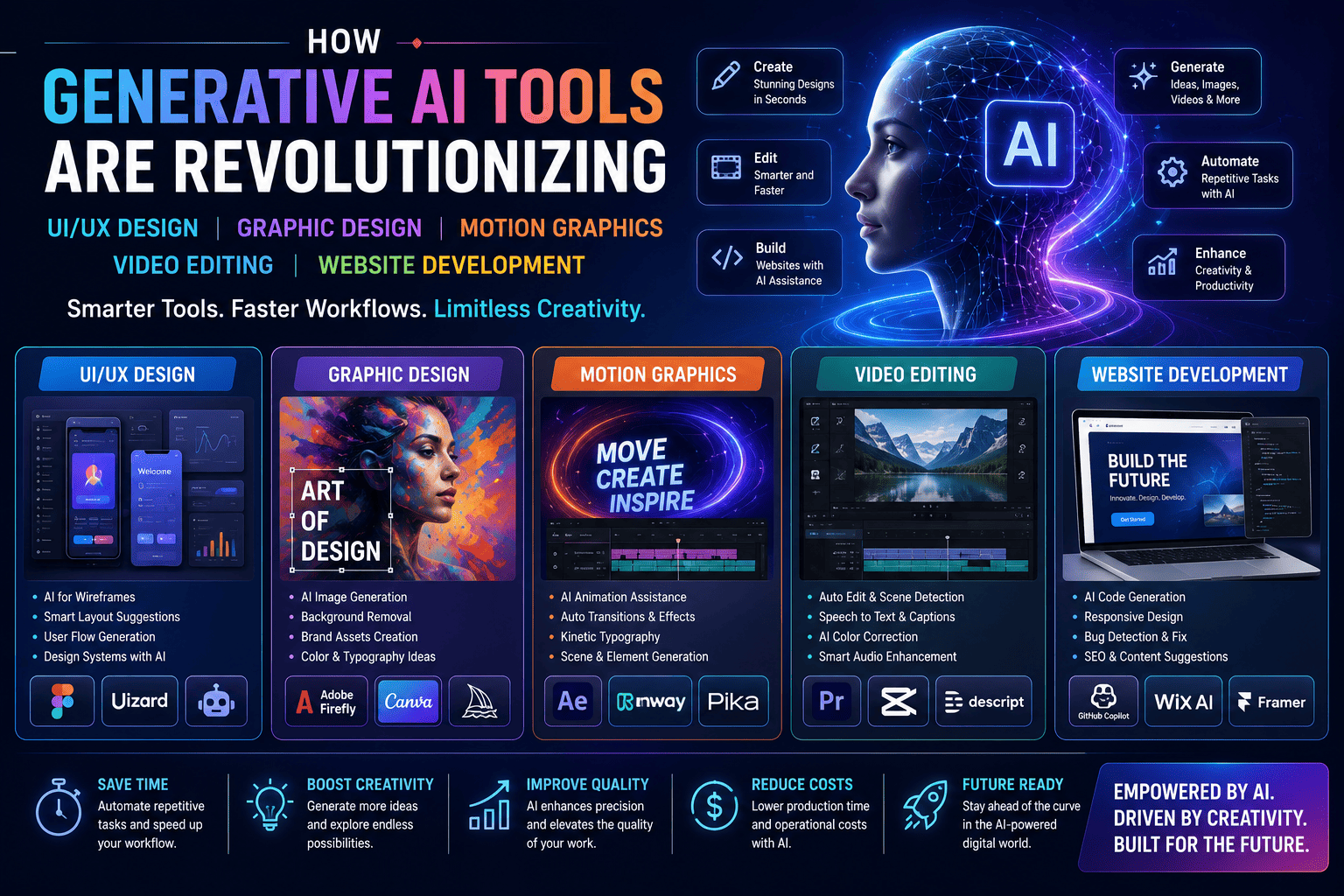
Generative Artificial Intelligence (AI) is transforming the creative industry at an unprecedented pace. From designing intuitive user interfaces and creating stunning graphics to producing cinematic videos and building responsive websites, AI-powered tools are redefining how creative professionals work.
Rather than replacing designers and developers, Generative AI is helping them automate repetitive tasks, accelerate ideation, improve productivity, and focus on innovation. Professionals who combine creative expertise with AI proficiency are becoming increasingly valuable across industries.
In this guide, we’ll explore how Generative AI is revolutionizing UI/UX Design, Graphic Design, Motion Graphics, Video Editing, and Website Development—and why learning these skills together is essential for future-ready careers.
What Is Generative AI?
Generative AI refers to artificial intelligence systems capable of creating original content such as text, images, videos, code, audio, and design concepts based on prompts and training data.
Today’s AI-powered platforms assist professionals in:
- Content generation
- Image creation
- Code development
- Video production
- UI design
- Animation
- Marketing
- Workflow automation
Instead of replacing creativity, Generative AI amplifies it by enabling professionals to produce high-quality work faster.
Why Generative AI Is Transforming Creative Industries
Creative work often includes repetitive and time-consuming tasks. AI automates many of these processes, allowing professionals to spend more time on problem-solving, storytelling, strategy, and user experience.
Key advantages include:
- Faster project delivery
- Increased productivity
- Rapid prototyping
- Better collaboration
- Improved personalization
- Cost efficiency
- Creative experimentation
- Scalable content production
1. Generative AI in UI/UX Design
Modern UI/UX designers use AI to enhance every stage of the design process.
AI Applications
- User Research Assistance
- Persona Generation
- Wireframe Creation
- Interface Suggestions
- Accessibility Recommendations
- Design Systems
- Prototype Generation
- UX Content Suggestions
Benefits
- Faster ideation
- Reduced repetitive work
- Improved usability testing
- Better design consistency
- More efficient design iterations
Popular AI-Enabled Tools
- Figma AI
- Uizard
- Galileo AI
- ChatGPT
- Adobe Firefly
2. AI in Graphic Design
Graphic designers use AI to accelerate creative workflows while maintaining artistic direction.
AI Capabilities
- Image Generation
- Background Removal
- Smart Object Selection
- Brand Asset Creation
- Logo Concepts
- Color Palette Suggestions
- Typography Assistance
- Image Enhancement
Benefits
- Faster creative exploration
- Consistent branding
- Improved productivity
- Enhanced visual quality
- Rapid content creation
Popular Tools
- Adobe Firefly
- Canva AI
- Midjourney
- Leonardo AI
- Microsoft Designer
3. AI in Motion Graphics
Motion graphics professionals are using AI to simplify animation and enhance storytelling.
AI Features
- Animation Assistance
- Scene Generation
- AI Transitions
- Motion Tracking
- Visual Effects
- Automatic Subtitles
- Background Generation
- Object Removal
Benefits
- Shorter production timelines
- Better animation quality
- Increased creative flexibility
- Faster client revisions
- More engaging visual content
Popular Tools
- Adobe After Effects (AI features)
- Runway
- Kling AI
- Pika
- Adobe Firefly
4. AI in Video Editing
Video production has become faster and more efficient with AI-assisted editing.
AI Editing Features
- Auto Editing
- Speech-to-Text
- Auto Captions
- Scene Detection
- Noise Removal
- Voice Enhancement
- Color Correction
- AI Music Suggestions
Benefits
- Faster editing
- Professional-quality videos
- Improved accessibility
- Reduced production costs
- Better audience engagement
Popular Platforms
- Runway
- Descript
- CapCut AI
- Adobe Premiere Pro (AI features)
- DaVinci Resolve (AI features)
5. AI in Website Development
Website development has also embraced Generative AI, making coding and website creation faster and more accessible.
AI Applications
- Code Generation
- HTML/CSS Assistance
- JavaScript Suggestions
- Responsive Layouts
- Website Copywriting
- Bug Detection
- Performance Optimization
- SEO Recommendations
Benefits
- Faster development
- Improved coding efficiency
- Reduced debugging time
- Better user experiences
- Increased productivity
Popular AI Tools
- GitHub Copilot
- ChatGPT
- Replit AI
- Wix AI
- Framer AI
How Generative AI Connects Every Creative Discipline
A modern digital project may involve:
- Researching user needs
- Generating design ideas with AI
- Creating visual assets
- Producing motion graphics
- Editing videos with AI assistance
- Developing responsive websites
- Optimizing content for search engines
- Measuring performance and refining results
AI acts as a collaborative assistant throughout the entire creative workflow.
Skills You’ll Need Alongside AI
While AI improves productivity, employers still value human skills such as:
- Creative Thinking
- Design Thinking
- UX Strategy
- Storytelling
- Visual Communication
- Coding Fundamentals
- Problem Solving
- Collaboration
- Critical Thinking
- Ethical AI Usage
The strongest professionals combine AI literacy with creativity, technical expertise, and strategic decision-making.
Who Should Learn These Skills?
These future-ready skills are ideal for:
- Students
- Graduates
- Designers
- Developers
- Video Editors
- Motion Graphics Artists
- Freelancers
- Entrepreneurs
- Digital Marketers
- Creative Professionals
Career Opportunities
Professionals who understand AI-enhanced creative workflows can pursue roles such as:
- UI/UX Designer
- Graphic Designer
- Motion Graphics Designer
- Video Editor
- Web Designer
- Front-End Developer
- Creative Technologist
- AI Content Creator
- Product Designer
- Digital Marketing Specialist
- Creative Consultant
- Freelancer
Why Employers Value AI-Skilled Professionals
Organizations increasingly seek professionals who can:
- Work efficiently with AI tools
- Improve productivity
- Deliver projects faster
- Adapt to evolving technologies
- Innovate responsibly
- Enhance customer experiences
- Collaborate across creative and technical teams
Professionals who understand both traditional creative principles and AI-assisted workflows are well-positioned for long-term career growth.
Future Trends in Generative AI
The next generation of AI tools is expected to bring advancements in:
- Personalized design experiences
- Real-time content generation
- AI-assisted coding
- Intelligent animation
- Automated video production
- Enhanced accessibility
- Collaborative AI workspaces
- Predictive design systems
Professionals who embrace continuous learning will be better prepared for these innovations.
Frequently Asked Questions (FAQs)
1. What is Generative AI?
Generative AI refers to artificial intelligence systems that create original content—including text, images, code, audio, and videos—based on user prompts and learned patterns.
2. Is Generative AI replacing designers and developers?
No. AI supports professionals by automating repetitive tasks and accelerating workflows. Human creativity, strategic thinking, empathy, and design judgment remain essential.
3. Which AI tools are commonly used by designers and developers?
Popular tools include ChatGPT, Adobe Firefly, Figma AI, Midjourney, Leonardo AI, Runway, GitHub Copilot, Uizard, Wix AI, and Framer AI.
4. Do I need coding skills to use AI in website development?
Not always. Many AI website builders simplify development, but understanding HTML, CSS, JavaScript, and web development fundamentals remains valuable for creating customized, scalable websites.
5. Can beginners learn Generative AI alongside design and development?
Yes. Beginners can start with core creative and technical concepts before gradually incorporating AI tools into their workflow through hands-on projects.
6. Which industries hire AI-skilled creative professionals?
Technology, media, entertainment, advertising, education, healthcare, finance, e-commerce, gaming, startups, and corporate organizations all seek professionals who can combine AI with creative and technical expertise.
Conclusion
Generative AI is redefining how digital products are imagined, designed, developed, and delivered. By enhancing—not replacing—human creativity, AI empowers UI/UX designers, graphic designers, motion graphics artists, video editors, and web developers to work faster, experiment more freely, and produce high-quality results.
The future belongs to professionals who understand both creative fundamentals and AI-powered workflows. By learning UI/UX Design, Graphic Design, Motion Graphics, Video Editing, Website Development, and Generative AI tools together, you can build a versatile, future-ready skill set that supports careers in technology, media, marketing, freelancing, and entrepreneurship. Continuous learning, practical experience, and a strong portfolio will remain the keys to long-term success in the AI-driven digital economy.